

Interactive Tech Journalism
Issue 4 • December 2025
👋

Welcome to DevTech News

For the final issue of the year, we've got a dash of Batman, a little bit of Jeffrey Epstein, and a whole lot of interesting developments across cybersecurity, biotech, AI, and more. The Epstein piece is actually interactive, which sounds creepy at first, but you'll probably appreciate the effort behind the project.

Other than that, we've got also got some great tools in the lineup - including one built by a special someone - and some other goodies to close out the year. Thank you for being here. I wish you and yours a happy holiday season and a blessed new year. Without further ado, here are the top stories this month:

Featured Stories

💻

DevTech

💻

Six Hidden Chrome DevTools Features Every Developer Should Know

Rachel Kaufman explores six lesser-known Chrome Developer Tools techniques that can revolutionize your debugging workflow. From timing functions with console.time() and console.timeEnd() to monitoring third-party function calls without modifying source code, these features address real-world development challenges.

Discover how DOM breakpoints can catch unexpected changes, learn to make any webpage editable for testing edge cases, and explore Chrome's action recording capabilities for automated testing. Plus, get insights into selective network throttling—a Chrome Canary feature that lets you simulate specific API failures without affecting overall performance.

Read Part One Read Part Two

Quick Hits

npm security update disables classic token creation effective November 5th.

Read Article

Salman Hoque challenges the "vibe coding" frustration with AI by shifting focus beyond code generation.

Read Article
📜

AI

📜

Was the Declaration of Independence Written by...ChatGPT?

Dianna Horacek, an SEO content specialist who specializes in human-written copy for legal websites, recently ran an interesting experiment. She fed the text of the U.S. Declaration of Independence into an AI content detector and the tool's assessment was that it was 98.51% likely that it was written by AI.

Her find set off a broader conversation on LinkedIn and other corners of the internet about the over-reliance on AI detectors. The story was even picked up by Forbes.com and a high school news website. Both publications discussed how the current approach to detecting AI writing is fundamentally broken and has resulted in real-world harm. I think the issue here is that everyone recognizes we have an AI writing problem, but because no good solutions exist to address it, institutions are hastily relying on anything that delivers promises - even if those promises aren't being kept.

Read Forbes Story Read High School Story

Quick Hits

OpenAI's Sam Altman and Apple's former chief designer Jony Ive recently mentioned that they are working on a new tech gadget. Altman's loose description of the device sounds like a privacy nightmare, but feel free to judge for yourself.

Read Article

AI workers who train chatbots and evaluate AI responses are warning their friends and family to avoid generative AI. Find out why.

Read Article
🍺

CyberSec

🍺

Asahi Admits Ransomware Gang May Have Spilled Almost 2 Million People's Data

Back in September, Asahi disclosed a cyberattack that knocked out ordering, shipping, and call center systems across its Japanese operations. Now the brewery has finally tallied the damage: almost 2 million people's personal data may have been compromised when the Qilin ransomware crew breached their datacenter and allegedly stole 27GB of files including employee records, contracts, and financial documents.

Perhaps the most bizarre aspect of this story is the 1.525 million people who contacted customer service. I'm trying to think of a situation where someone would need to troubleshoot beer or have a beer emergency. The story also noted that there were 114,000 people who received condolence or congratulatory telegrams, which I had a difficult time visualizing as well. Sorry for your loss. Here's a 20% off coupon on your next six pack to help you get through it. Who knows, but one thing is for sure: cybercriminals will go after anything. Yes, even your beer.

Read Full Article

Quick Hits

Hackers from China are leveraging Claude to refine phishing emails, generate malicious code, and automate reconnaissance tasks.

Read Article

Samourai Wallet founders Keonne Rodriguez and William Lonergan Hill have been sentenced to prison for operating an unlicensed money transmitting business that facilitated over $2 billion in cryptocurrency laundering.

Read Article
🧬

BioTech

🍄

Would You Eat Gene-Edited Mushrooms That Chew and Taste Like Meat?

As global protein demand is expected to double by 2050, researchers from Jiangnan University in China have used CRISPR gene editing to engineer Fusarium venenatum fungus into a more efficient meat alternative. The team knocked out specific genes to make the fungus easier to digest while requiring 44% less sugar and producing protein 88% faster than unmodified strains.

The breakthrough addresses major limitations of fungal protein: thick cell walls that resist human digestion and resource-intensive production. By removing genes for chitin synthase and pyruvate decarboxylase enzymes, researchers created a strain that could require 70% less land than chicken farming to produce equivalent protein. This comes as plant-based alternatives face declining sales and lab-grown meat encounters regulatory pushback across multiple U.S. states and countries.

Read Full Article

Quick Hits

Generative AI is revolutionizing genome analysis by creating synthetic DNA sequences that help researchers understand gene function and design new biological systems.

Read Article

Scientists have developed brain implants smaller than human cells that can be injected directly into blood vessels to monitor neural activity.

Read Article
🪱

Tales from the Analog

🪱

Doctors Pull 4-Inch Worm Out of Woman's Eyelid After Month-Long Incubation

A 26-year-old woman in Romania sought medical attention for a persistent lump on her eyelid, only to discover it contained a living 4-inch parasitic worm. The Loa loa worm had been incubating for over a month after being transmitted through a deer fly bite, causing swelling and discomfort that doctors initially misdiagnosed as a simple cyst.

The surgical removal, documented in the New England Journal of Medicine, required careful extraction to avoid breaking the worm and causing additional complications. Loa loa, also known as the African eye worm, typically affects people in West and Central Africa but can appear in travelers who visit endemic regions. The patient made a full recovery with no lasting vision problems.

Read Full Article

Quick Hits

New research suggests that writing by hand activates brain networks differently than typing, potentially building psychological resilience and improving emotional processing in ways that digital communication cannot replicate.

Read Article

The Louvre closed temporarily after staff discovered a robbery attempt involving stolen artifacts, highlighting ongoing security challenges at major cultural institutions worldwide.

Read Article
💬

It's How They Said It

We want to cheat on everything.
— The opening line of a product manifesto for Cluely, an "undetectable AI assistant" co-launched by Chungin Lee, who was suspended from Columbia University for using an early prototype of the tool to cheat his way through coding interviews.
🔢

The Numbers Game

🔐
65
PERCENT
of the Forbes Top 50 AI companies have leaked API keys, tokens, and other credentials on GitHub according to security firm Wiz. The most common leaks came from Jupyter Notebook, Python, and environment files containing keys from Hugging Face, Azure OpenAI, and WeightsAndBiases platforms.
Read More
🚶‍♂️
106
KM
or 65 miles for U.S. readers, is the distance China's AgiBot A2 humanoid robot walked nonstop to set a Guinness World Record. The 5.74-foot tall robot trekked from Suzhou to Shanghai over four days without powering off, thanks to its hot-swappable battery system.
Read More
🦸‍♂️
67+
PERCENT
of subway passengers offered their seats to a visibly pregnant woman when a man dressed as Batman was present, compared to just 37% without him. This "Batman Effect" study found that unexpected, offbeat events can jolt people out of mental autopilot and increase prosocial behavior.
Read More
⚒️

Tools and Resources

🖼️⚡

Smart Image Compressor

First up, we've got a tool that I personally built after toiling in the WebAssembly mines for several days, debugging my way to the glorious final version that exists now.

Now, I know what you're probably thinking: Great, another newsletter editor shamelessly plugging their own tool. But hear me out, this bad boy is genuinely excellent at optimizing images without quality loss. I use it myself almost daily. It handles up to 20 files at once (even big ones) for batch processing, and includes a live before/after preview with a drag-to-compare slider. I also built everything so that the images are processed in your web browser, meaning that everything stays 100% private. Use it for all your JPEG, PNG, and WebP files and share it with your friends…even your enemies if you want.

Check it Out
📁✨

VueFinder

This sleek Vue 3 file manager component brings native file explorer functionality directly into your web applications. With zero backend lock-in, VueFinder connects to any storage solution—local, S3, or custom backends built with PHP, Node.js, Python, or other technologies.

Includes complete file operations (upload, download, rename, delete), archive handling, built-in text editor, image cropping, multi-format previews, and a tree view sidebar. Built on TypeScript with TanStack Query and includes 12 themes, 17 languages, keyboard shortcuts, drag-and-drop, and virtual column rendering for optimal performance.

Check it Out
🦁⚡

JavaScript Zoo

This interactive benchmark platform evaluates 60+ JavaScript engines across performance metrics, ECMAScript compliance, and implementation details. From mainstream engines like V8 and SpiderMonkey to embedded solutions like QuickJS and Duktape, it provides sortable, filterable comparisons with real performance data.

Includes Docker environments for testing code across multiple runtimes, detailed metadata on source code size, binary metrics, and standards compliance. Essential for developers selecting engines for embedded systems, performance research, or studying interpreter design patterns across diverse JavaScript implementations.

Check it Out
🎬

What Am I Looking At?

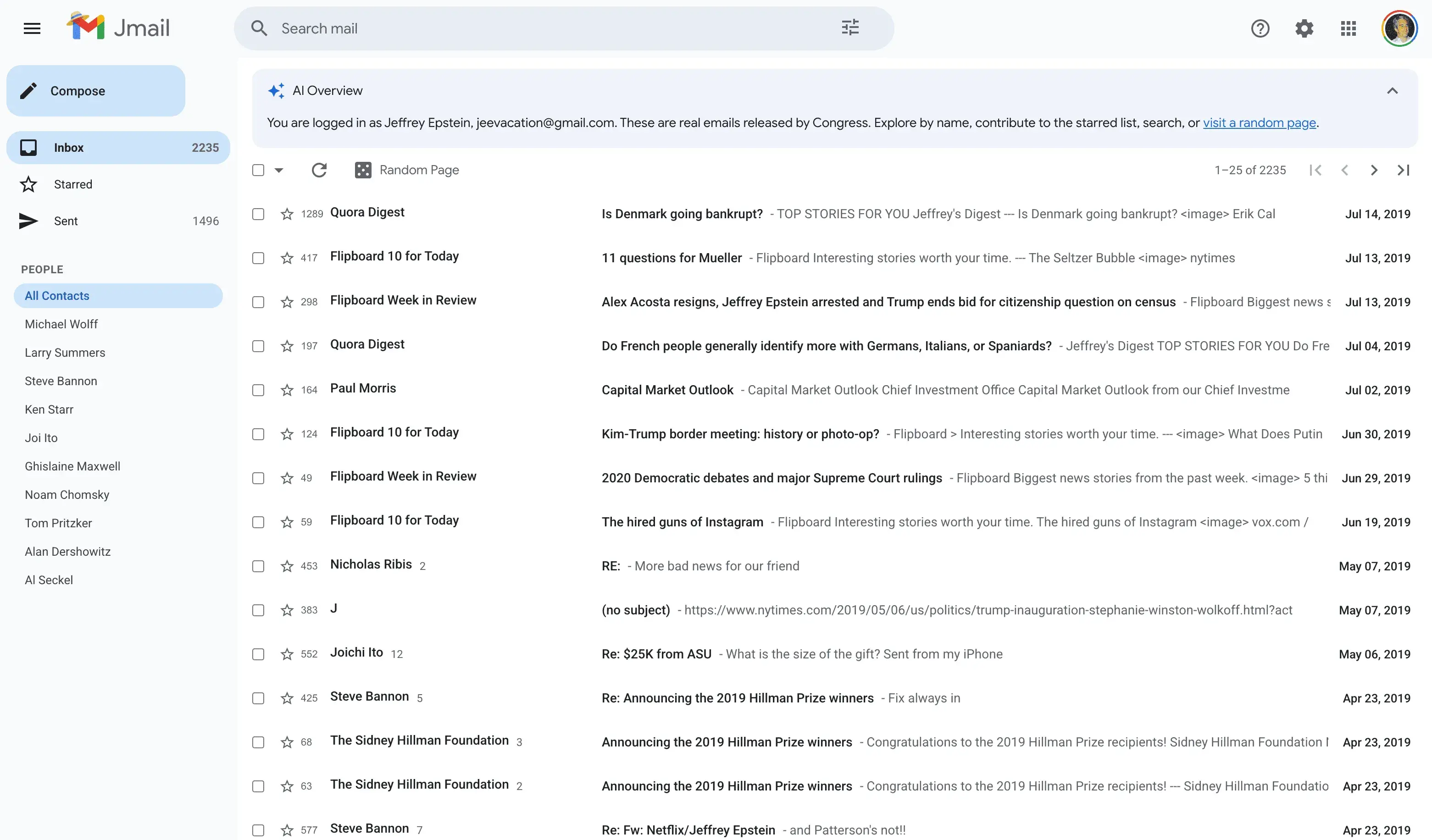
Jmail - Jeffrey Epstein email interface

I know what you might be thinking: this is just a Gmail interface, how is this innovative or interesting, and why is it here? Well, if you look a little closer, it's not Gmail, it's...Jmail! A fake Gmail inbox that lets you sift through more than 2,000 of Jeffrey Epstein's emails. This surreal project represents the weird and fascinating side of the internet that still exists despite corporate and AI bot takeover.

Created by San Francisco tech duo Riley Walz and Luke Igel, Jmail transforms thousands of PDF documents from the U.S. House Oversight Committee into a pitch-perfect Gmail interface. Using Google Gemini's optical character recognition, they extracted and organized the text while linking every email to original scans for verification.

The emails range from benign to surreal to horrifying - including infamous messages like Epstein's brother asking Steve Bannon whether "Putin has the photos of Trump blowing Bubba?" Users have crowdsourced starred messages highlighting the strangest discoveries.

While the subject matter is disturbing, the project demonstrates how creative developers can transform inaccessible public records into tools that toe the line between art and functionality - making important documents searchable and digestible in ways traditional archives cannot.

Explore Jmail
Martin's Corner

Martin's Corner

Thanks for being here and joining me for the last issue of the year. I hope you enjoyed it and that your personal projects are moving along.

I've been experimenting with gsap the past few weeks, and while it's been fun, it's also been extremely challenging. I actually wanted to incorporate a gsap component as a background in this month's issue, but ultimately couldn't get it to render exactly how I envisioned, so I tabled it for now. If I don't get pulled in other directions, maybe you'll see it next month.

Other than that, I wish you a happy St. Nicholas to those of you who celebrate it (we call it Mikuláš in Slovakia), and also a Merry Christmas. Enjoy the time, and I'll see you at the start of 2026.